Management reporting
How to Prepare Monthly Management Reporting Without Replacing Excel
Keep Excel for inspection and presentation. Move definitions, retrieval, comparisons and traceability into a governed layer below the workbook.
Excel persists in management reporting because it is good at the final mile. Finance can inspect a number, change a presentation, add context and shape a pack around the needs of the business without waiting for a system change.
The fragility usually sits earlier in the process: copied exports, hidden mappings, stale scenario tabs and definitions that have to be reconstructed in each workbook. Replacing Excel does not automatically solve those problems. Moving governed retrieval and calculation below Excel often does.
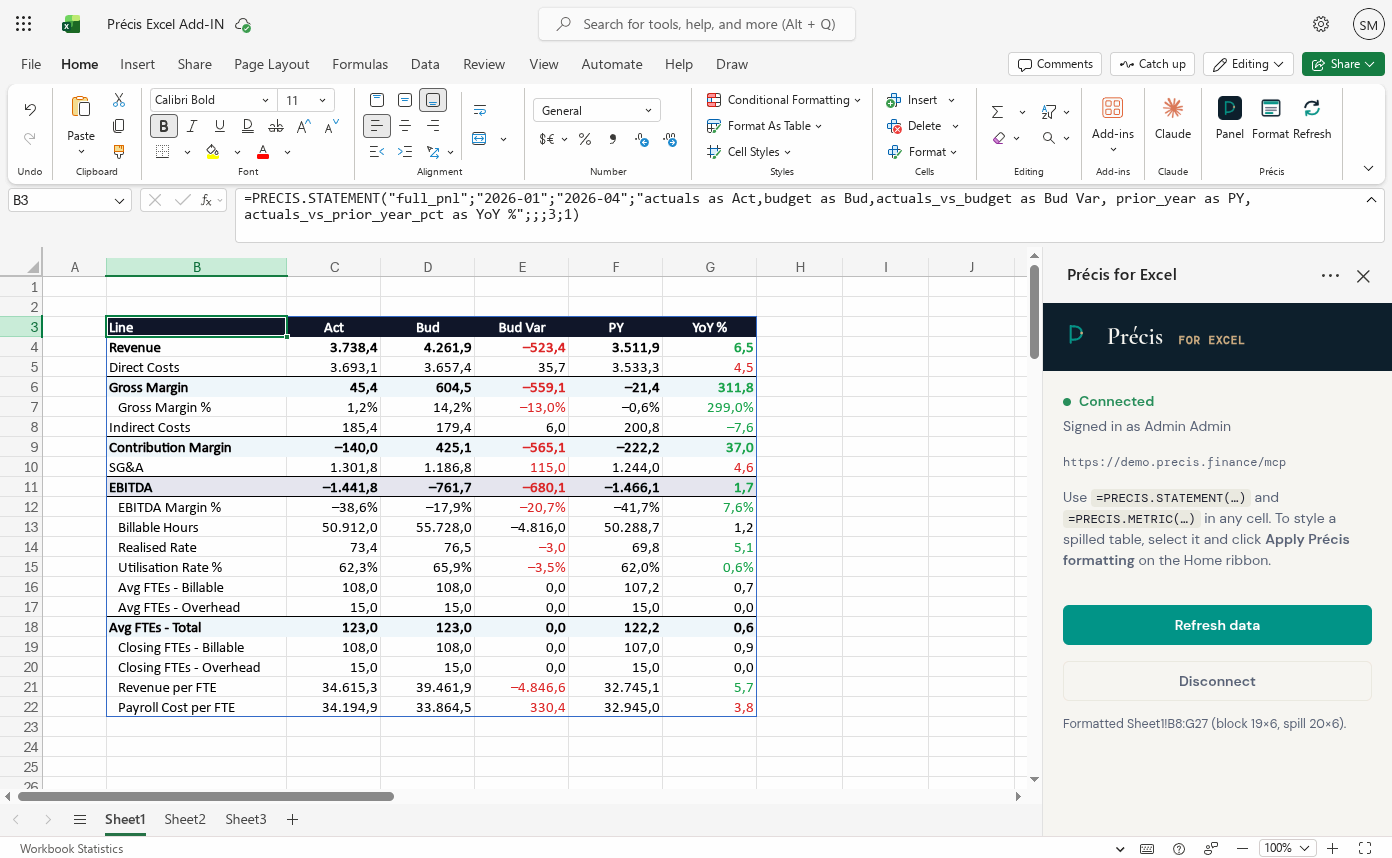
Separate the workbook from the finance definition
A management-reporting workbook commonly performs three jobs at once:
- retrieves data from source exports;
- defines how accounts, periods and scenarios should be interpreted; and
- presents the result for review and distribution.
The third job is where Excel is strongest. The first two are where duplicated logic and manual handling accumulate. The practical target is not “no Excel”. It is a workbook that consumes approved finance structures instead of owning a private version of them.
Start with the recurring definitions
Before changing the workbook, make the reporting contract explicit:
- the account mappings and ordered statement lines;
- the fiscal period and calendar rules;
- the named actual, budget and forecast scenarios;
- the organisational hierarchies used for reporting;
- the aggregation behaviour of percentages, rates and closing balances; and
- the detail each user is permitted to retrieve.
These rules may live in a semantic model, finance catalogue or another governed layer. The technology matters less than having one reviewed location that every consuming workbook can call.
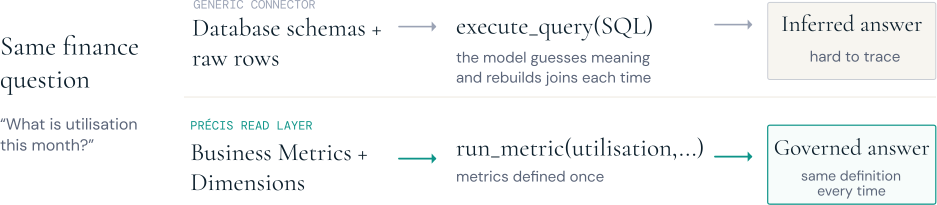
Change the definition once, not in every workbook
The value of a governed layer becomes clearer when a definition changes. If finance revises EBITDA, adds a new ratio or changes how a statement line rolls up, that logic is maintained once in the finance catalogue. Every connected workbook calls the same definition and receives the approved result on its next refresh.
The workbooks do not have to be identical. They can present the same metric in different packs, add local commentary and support different review workflows. What they no longer need is a copied EBITDA formula that becomes obsolete in one file and survives unnoticed in another.
This gives finance one maintained reporting contract. A definition change still needs review and testing, but there is one controlled place to make it and a known set of connected outputs to validate.
Replace copy and paste with a live read route
The workbook should ask for a statement, metric or approved member list and receive a structured result. It should not need an analyst to export a CSV, paste values into a hidden tab and check whether the columns moved this month.
A useful live route has four properties:
- refresh is deliberate and visible;
- the period, scenario and filters travel with the request;
- the result uses the same definition as other reports and interfaces; and
- failures are explicit rather than silently preserving stale figures.
This can be implemented with worksheet functions, a controlled query layer or another governed connector. The important change is that retrieval becomes a repeatable operation.
Keep presentation and review in Excel
Once the governed statement or metric is in the workbook, finance can continue to use Excel for the work it does well: presentation, review adjustments, supporting schedules, sensitivity checks and the final shape of a recurring pack.
This division also makes ownership clearer. The governed layer owns the financial definition and source retrieval. The workbook owns local presentation. Finance owns the interpretation and sign-off.
| Line / driver | Actual | Budget | Vs budget | Prior year | YoY |
|---|---|---|---|---|---|
| Revenue | 7,420 | 7,650 | −230 | 7,110 | +4.4% |
| Direct costs | (4,560) | (4,440) | −120 | (4,320) | −5.6% |
| Gross profit | 2,860 | 3,210 | −350 | 2,790 | +2.5% |
| Gross margin % | 38.5% | 42.0% | −3.5pp | 39.2% | −0.7pp |
| Operating costs | (1,240) | (1,280) | +40 | (1,180) | −5.1% |
| EBITDA | 1,620 | 1,930 | −310 | 1,610 | +0.6% |
| EBITDA margin % | 21.8% | 25.2% | −3.4pp | 22.6% | −0.8pp |
| Billable hours | 62,840 | 64,200 | −1,360 | 60,910 | +3.2% |
| Realised rate | €118.1 | €119.2 | −€1.1 | €116.7 | +1.2% |
| Utilisation % | 74.8% | 76.0% | −1.2pp | 73.5% | +1.3pp |
| Avg FTEs — billable | 142 | 140 | +2 | 137 | +3.6% |
| Avg FTEs — overhead | 40 | 40 | — | 39 | +2.6% |
| Avg FTEs — total | 182 | 180 | +2 | 176 | +3.4% |
Design for refresh, not just the first load
The first successful data pull is not the hard part. Monthly reporting needs to survive a source update, a revised forecast, a changed hierarchy and a new workbook owner.
For each live block, show the scenarios, period, units, filters and refresh time. Keep manual adjustments separate from retrieved figures. If a definition changes, update it below the workbook and test the affected outputs rather than editing every file independently.
Do not turn every cell into a remote call. Retrieve coherent blocks and reuse member lists so the workbook remains understandable and performs predictably.
Keep write-back separate from reporting reads
A live reporting function does not need permission to change a plan. Keeping the first Excel integration read-only narrows the risk: formulas can retrieve permitted statements and metrics, but they cannot commit a scenario or change platform state.
If the wider workflow later needs write-back, treat it as a distinct process with explicit permissions, validation, review and version history. Do not hide a state change behind an ordinary worksheet refresh.
A practical monthly transition
Choose one stable management report and run the new route alongside the current process:
- Document the existing definitions and reconciliations.
- Move one statement and its comparisons into governed definitions.
- Connect the workbook to that read route.
- Reconcile both outputs for several cycles.
- Retain the current review and sign-off.
- Remove the manual extraction only when finance is satisfied.
This approach proves the definition, retrieval and review boundary without asking the team to redesign the whole reporting estate at once.
How Précis approaches the workflow
The Précis Excel add-in exposes live, read-only worksheet functions for statements, metrics, scenarios, KPIs and hierarchy members. They call the same governed finance tools as other Précis clients and apply the same identity and scope checks.
The workbook remains recognisable. Précis provides the governed route by which the figures arrive; finance continues to review the analysis and decide what is published.
Next: Explore FP&A reporting in Excel or see the wider management-reporting workflow.