Précis Finance MCP · the open core of Précis
Give AI agents the finance information they need to help you work.
Work through reporting, budget comparisons and ad-hoc finance questions in Claude or ChatGPT. Précis Finance MCP connects your agent to financial statements, metrics and supporting detail from your finance systems, using your approved definitions and read-only calculations.
Explore sample finance data. No Précis account or registration required.
- Read-only
- Governed calculations
- Traceable figures
- Excel add-in
Work through the questions behind your numbers.
Ask your agent for a financial statement, a comparison or the detail behind a figure. Précis Finance MCP retrieves the information using your configured finance model.
- Review performance
- “Show the P&L with actuals and budget side by side.”
- Investigate a variance
- “How much of the revenue variance against budget comes from price versus volume?”
- Explore supporting detail
- “Show the transactions behind this cost-centre figure.”
- Compare over time
- “Plot gross margin by month, compared with last year.”
| Cost centre | Actual | Budget | Variance |
|---|---|---|---|
| Advisory · Munich | €1,247,800 | €1,180,000 | +€67,800 |
| Advisory · Berlin | €894,200 | €920,000 | −€25,800 |
| Engineering | €2,108,500 | €2,050,000 | +€58,500 |
| Data & ML | €612,400 | €680,000 | −€67,600 |
| Total | €4,862,900 | €4,830,000 | +€32,900 |
The same figures, in the spreadsheet your team already uses.
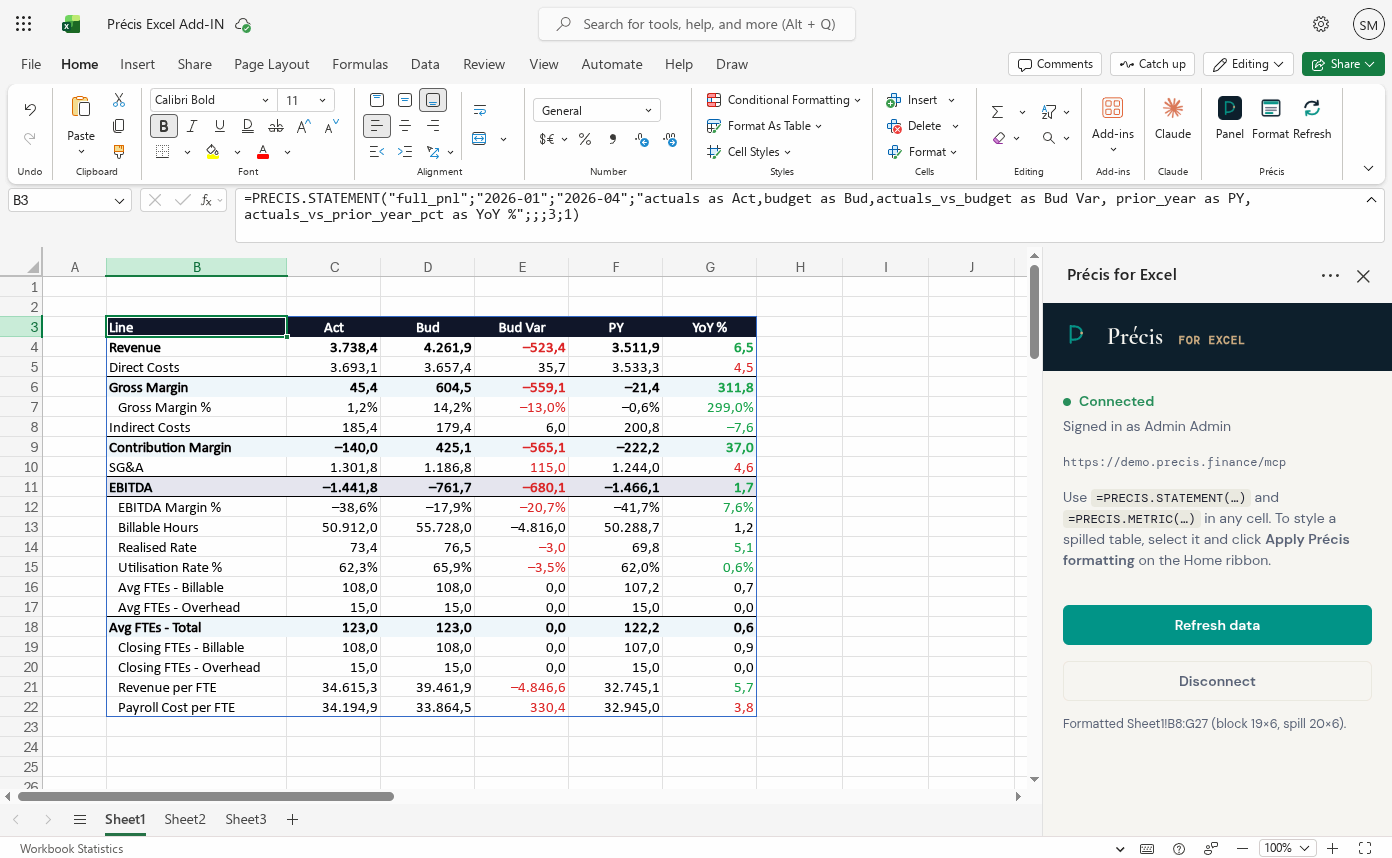
Bring financial statements and metrics directly into your workbook with the Précis Excel add-in. Your spreadsheet uses the same finance model and definitions as your agent.
Retrieve a statement with =PRECIS.STATEMENT(…)
or a metric with =PRECIS.METRIC(…), refresh
the figures on demand, and use them in your own analysis and reporting.
Available in desktop Excel and Excel on the web.
Working with Copilot in Excel? Give it the Précis function reference and your finance model, then ask it to help build formulas that retrieve the statements and metrics you need.
Your definitions. Your permissions. Read-only access.
Précis Finance MCP runs on your infrastructure and connects agents to the finance information you choose to make available.
- Your financial definitions
- Statements, metrics and comparisons follow your configured finance model. The Précis engine calculates the figures returned to your agent.
- Information you can check
- Results retain the financial context—period, scenario, account and cost centre—with access to permitted supporting transactions.
- Access you control
- Define which information each user can retrieve. Permissions apply when the data is queried.
- Read-only tools
- Agents can retrieve information through Précis Finance MCP without changing your source data.
The code is source-available and can be deployed in your own environment. Your team reviews the analysis and decides what to do.
Deployment and security documentation →Précis Finance MCP connects your information. Précis adds the finance workflow.
Précis Finance MCP
- Query financial statements and metrics through Claude or ChatGPT
- Compare actuals, budgets and forecasts
- Drill into supporting detail
- Retrieve governed figures in Excel
Précis adds
- A dedicated finance workspace and conversational agent
- Model scenarios and commit approved changes
- Prepare reports and management packs
- Scheduled briefings and Excel write-back
Both use the same finance model. Moving to Précis builds on the data and definitions you already configured.
Explore Précis →Try it with sample finance data.
Connect Claude, ChatGPT or another supported MCP client to explore financial statements, comparisons and supporting transactions in a sample finance model. No Précis registration or API key required.
Enter this MCP connection URL in your client:
https://mcp.precis.finance/mcpFirst question: “What finance information is available?”
The public demo uses a shared synthetic dataset. To work with your own finance information, deploy and configure your own instance—or discuss your setup with us.
Ready to use Précis Finance MCP with your own data?
Need help setting up your own instance, or want a private demo for your team? Leave your contact details and we’ll get in touch to discuss what you need.
Bringing IT or finance into the conversation?
- View on GitHub — explore the code and local setup instructions.
- Security & deployment — understand deployment, permissions and read-only access.
- Finance brief (PDF) — a short introduction to Précis for finance leaders.